The short answer
To block work apps on weekends on iPhone, use Screen Time’s Downtime on custom days (Screen Time Schedule in iOS 27), which closes everything except your allowed apps, or a work app blocker with a weekend schedule. If you only need quiet, a weekend Focus plus Slack and Teams notification schedules will silence work without closing anything. Out of Office does it in one step: its Weekends schedule shields only your work apps from Friday 6:00 PM to Monday 8:00 AM.
Ways to turn off work apps on weekends
You have four main options, and they do different things:
- A weekend Focus silences notifications. Apps still open.
- Screen Time on custom days makes apps unavailable, but it covers everything except an allowed list.
- Slack and Teams settings stop notifications from those apps only.
- A work app blocker shields just the work apps you pick.
Silencing stops the buzzing. Blocking stops the Saturday morning “quick look”. Most people end up pairing one silencing option with one blocking option. The weeknight version of this is in how to block work apps after hours, and how to choose an app blocker for work compares the blocking options side by side.
Set a weekend Focus on iPhone
- Go to SettingsFocus and tap the Focus you want to use for weekends, or add a new one.
- Choose which people and apps can notify you while it’s on, and leave your work apps out.
- Under Set a Schedule, tap Add Schedule and choose a time.
- Set the start and end times, and pick Saturday and Sunday as the days.
If you already have a weeknight Focus for evenings, add the weekend as a second schedule on the same Focus. For a dedicated work setup, see how to use a Work Focus on iPhone.
Use Screen Time Downtime on weekends
On iOS 26 and earlier:
- Go to SettingsScreen Time and make sure App & Website Activity is on.
- Tap Downtime, then tap Scheduled.
- Choose Customize Days, then set start and end times for the days you want, like Saturday and Sunday.
- To make it a real block, set a Screen Time passcode and turn on Block at Downtime.
On iOS 27, Apple’s guide puts this in SettingsScreen TimeScreen Time Schedule: turn on Schedule, tap Add Schedule, tap the days of the week, then set the time window.
Turn off Slack and Teams notifications on weekends
Slack
- In the Slack app, tap your profile picture, then tap Notifications.
- Below Notification schedule, tap Allow notifications and choose Weekdays, or Custom to pick the days yourself.
- Set the start and end times when you want notifications.
Outside those hours, Slack pauses notifications. People can still choose to notify you about an urgent direct message. More in how to stop Slack notifications after work.
Microsoft Teams
- In Teams on your iPhone, tap your profile picture, then tap Notifications.
- Under Block notifications, tap Block during quiet hours.
- Turn on All day and pick Saturday and Sunday. Use Certain hours for weeknights.
During quiet time, Teams doesn’t send sound or push notifications, but new activity is still there when you open the app. See how to set Teams quiet hours on iPhone.
Shield work apps from Friday 6 PM to Monday 8 AM
If you want Slack, Teams and Outlook closed all weekend while the rest of your phone stays normal, a work app blocker fits. In Out of Office, the Weekends schedule runs from Friday 6:00 PM to Monday 8:00 AM. Opening a work app in that window shows a shield with one button, “OK, fine”.
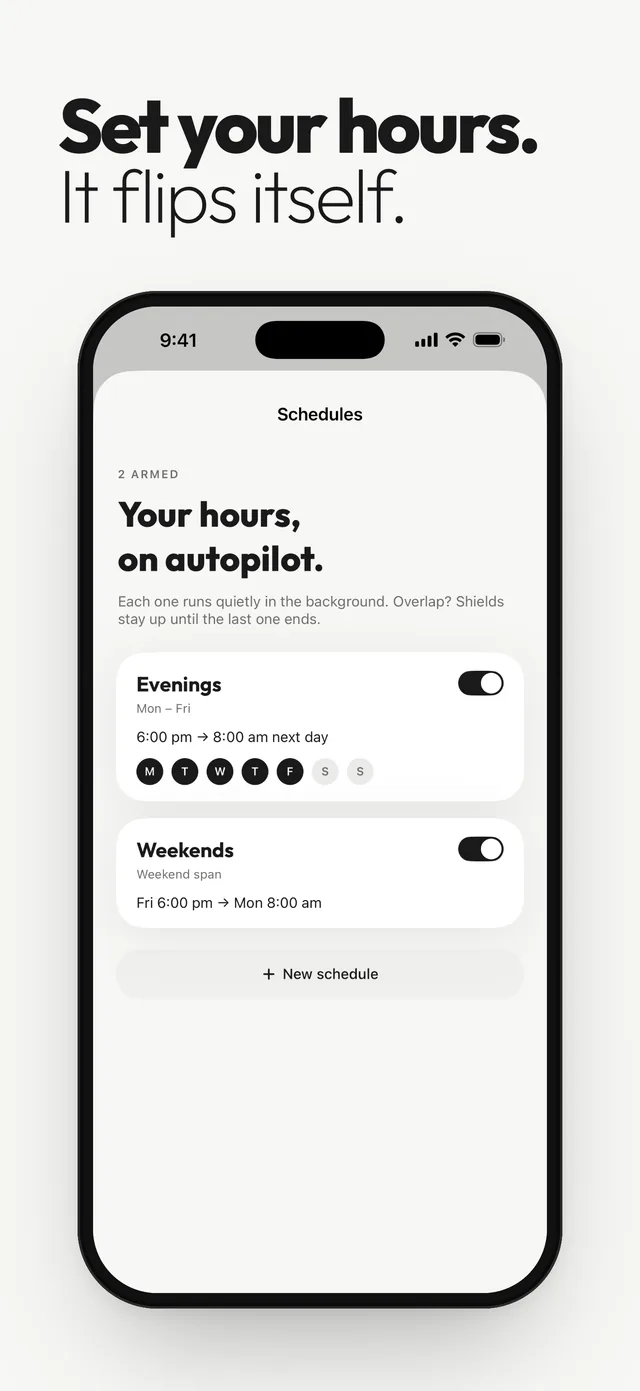
- Overlap with evenings. Run Evenings and Weekends together. Friday night is covered by both, and shields stay up until the last one ends, so nothing pops back open in between.
- Leaving early. Tap “All weekend” on a Friday afternoon and it turns on now until Monday at 8:00 AM.
- A heads-up on Monday. A heads-up before the session ends tells you work apps are coming back. You can change the lead time or turn it off.
The shield doesn’t silence notifications, so keep the Slack and Teams settings above. Everything else about the app is in the Out of Office app overview.
Long weekends, holidays and vacation
Weekly schedules don’t know about a holiday Monday. In Out of Office, add a Vacation schedule with the day it starts and the day apps unblock, and it runs once alongside your weekly schedules. Set your email auto-reply too, with how to set an out of office reply on iPhone and how to turn off work email on vacation.
Questions
Can I turn off work apps only on weekends on iPhone?
Yes. Use Downtime with custom days (Screen Time Schedule in iOS 27), a Focus scheduled for Saturday and Sunday, or a work app blocker with a weekend schedule.
How do I stop Slack notifications on weekends?
In the Slack app, tap your profile picture, then Notifications. Under Notification schedule, set Allow notifications to Weekdays.
How do I stop Teams notifications on weekends?
In Teams on iPhone, tap your profile picture, then Notifications, then Block during quiet hours. Turn on All day and choose Saturday and Sunday.
Does a weekend Focus block apps?
No. A Focus silences notifications, but your work apps still open if you tap them.
Sources
Menu names change between app and iOS versions. These are the official pages, checked October 9, 2026.